> ## Documentation Index
> Fetch the complete documentation index at: https://docs.simplicity.ai/llms.txt
> Use this file to discover all available pages before exploring further.
# Quickstart
> Make your first API call with Simplicity AI in under 5 minutes.
## Overview
The Simplicity AI API lets you programmatically upload documents, trigger AI-powered form filling, and retrieve completed results. This guide walks you through authenticating and making your first API call.
**Base URL**
```text theme={null}
https://api.simplicity.ai
```
***
## Step 1: Authenticate
Simplicity AI supports two authentication methods depending on your use case.
### Option A — API Key (Recommended for server-to-server)
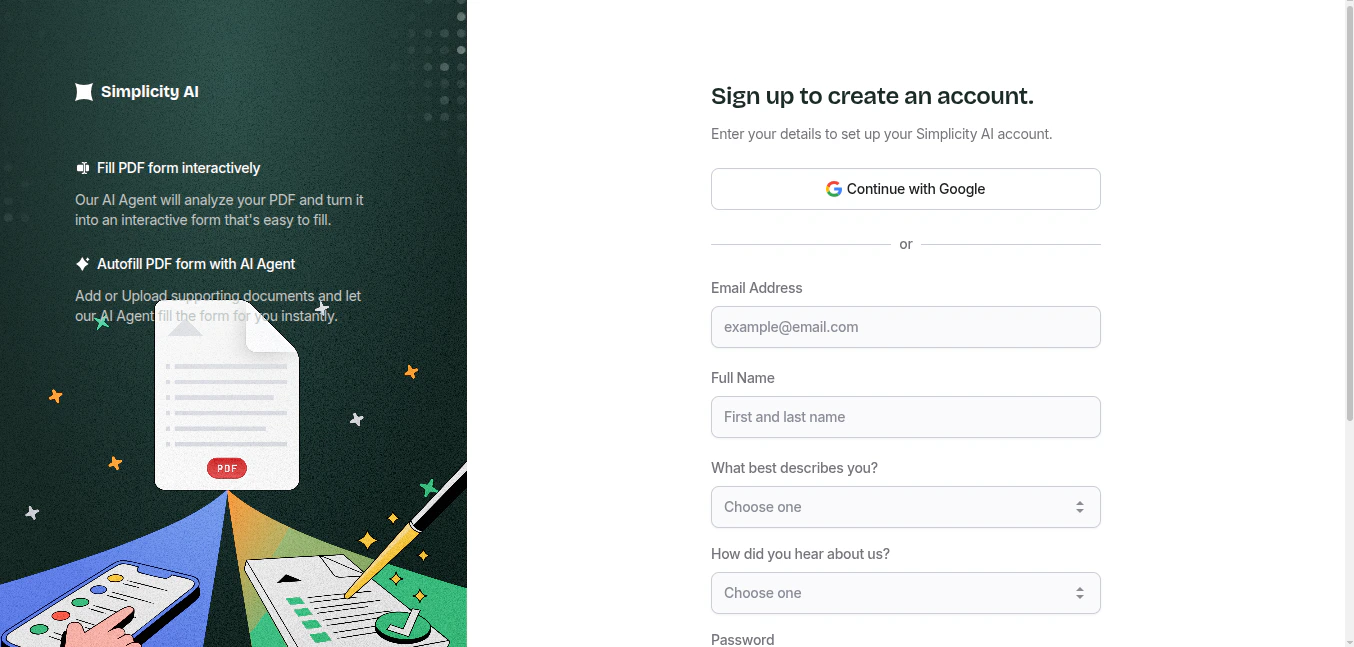
* **(a)** Visit **simplicity.ai**
and create an account
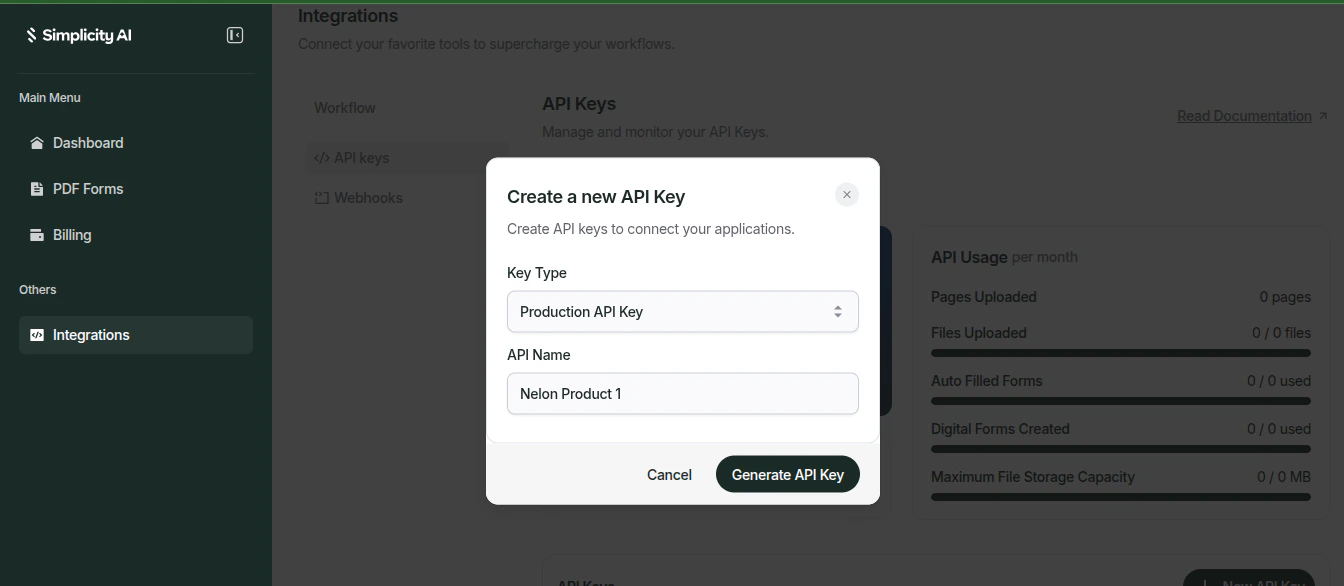
 * **(b)** Generate an API key from your [dashboard](https://simplicity.ai/dashboard) under **Integrations → API Keys**. Pass it as the `X-API-Key` header on every request.
 ```http theme={null}
X-API-Key: YOUR_API_KEY
```
Keep your API key secret. Never expose it in client-side code or public repositories. Regenerate it immediately from the dashboard if it is ever compromised.
### Option B — External User ID (For user-scoped requests)
If you are building a multi-user application, you can scope API requests to a specific user by passing their unique identifier in the `external-user-id`. This allows you to attribute document uploads and form submissions to individual users within your platform.
```http theme={null}
X-API-Key: YOUR_API_KEY
external-user-id: user_abc123
```
Use this when you want Simplicity AI to associate activity (uploads, form fills, history) with a specific user in your system rather than your account as a whole.
***
## Step 2: Upload a Document
Upload the PDF form you want to fill. The API returns a `task_id` you can use to track the upload progress.
You can upload a document with the param of `document_type` which could be:
**(a) SOURCE\_DOCUMENT**: These are documents that are used as knowledge bases or data source for the AI agent when filling a form document.
```bash cURL theme={null}
curl --request POST \
--url 'https://api.simplicity.ai/documents/upload-document?document_type=SOURCE_DOCUMENT' \
--header 'X-API-Key: YOUR_API_KEY' \
--form 'file=@/path/to/your-form.pdf'
```
```javascript Node.js theme={null}
import fs from "fs";
import FormData from "form-data";
import fetch from "node-fetch";
const form = new FormData();
form.append("file", fs.createReadStream("./your-form.pdf"), "your-form.pdf");
// document_type defaults to SOURCE_DOCUMENT if not specified
// Use FORM_DOCUMENT for the form to be filled, SOURCE_DOCUMENT for knowledge base files
const response = await fetch(
"https://api.simplicity.ai/documents/upload-document?document_type=SOURCE_DOCUMENT",
{
method: "POST",
headers: {
"X-API-Key": "YOUR_API_KEY",
...form.getHeaders(),
},
body: form,
}
);
const data = await response.json();
console.log(data); // { task_id: "..." }
```
```python Python theme={null}
import requests
url = "https://api.simplicity.ai/documents/upload-document"
params = {"document_type": "SOURCE_DOCUMENT"}
files = {
"file": ("your-form.pdf", open("your-form.pdf", "rb"))
}
headers = {"X-API-Key": "YOUR_API_KEY"}
response = requests.post(url, params=params, files=files, headers=headers)
print(response.text) # { "task_id": "..." }
```
```go Go theme={null}
package main
import (
"bytes"
"fmt"
"io"
"mime/multipart"
"net/http"
"os"
"path/filepath"
)
func main() {
file, _ := os.Open("./your-form.pdf")
defer file.Close()
var body bytes.Buffer
writer := multipart.NewWriter(&body)
part, _ := writer.CreateFormFile("file", filepath.Base("your-form.pdf"))
io.Copy(part, file)
writer.Close()
// document_type defaults to SOURCE_DOCUMENT if not specified
// Use FORM_DOCUMENT for the form to be filled, SOURCE_DOCUMENT for knowledge base files
req, _ := http.NewRequest(
"POST",
"https://api.simplicity.ai/documents/upload-document?document_type=SOURCE_DOCUMENT",
&body,
)
req.Header.Set("X-API-Key", "YOUR_API_KEY")
req.Header.Set("Content-Type", writer.FormDataContentType())
client := &http.Client{}
resp, _ := client.Do(req)
defer resp.Body.Close()
respBody, _ := io.ReadAll(resp.Body)
fmt.Println(string(respBody)) // { "task_id": "..." }
}
```
**(b) FORM\_DOCUMENT** : The actual form that will be converted to an interactive form.
```bash cURL theme={null}
curl --request POST \
--url 'https://api.simplicity.ai/documents/upload-document?document_type=FORM_DOCUMENT' \
--header 'X-API-Key: YOUR_API_KEY' \
--form 'file=@/path/to/your-form.pdf'
```
```javascript Node.js theme={null}
import fs from "fs";
import FormData from "form-data";
import fetch from "node-fetch";
const form = new FormData();
form.append("file", fs.createReadStream("./your-form.pdf"), "your-form.pdf");
// document_type defaults to SOURCE_DOCUMENT if not specified
// Use FORM_DOCUMENT for the form to be filled, SOURCE_DOCUMENT for knowledge base files
const response = await fetch(
"https://api.simplicity.ai/documents/upload-document?document_type=FORM_DOCUMENT",
{
method: "POST",
headers: {
"X-API-Key": "YOUR_API_KEY",
...form.getHeaders(),
},
body: form,
}
);
const data = await response.json();
console.log(data); // { task_id: "..." }
```
```python Python theme={null}
import requests
url = "https://api.simplicity.ai/documents/upload-document"
params = {"document_type": "FORM_DOCUMENT"}
files = {
"file": ("your-form.pdf", open("your-form.pdf", "rb"))
}
headers = {"X-API-Key": "YOUR_API_KEY"}
response = requests.post(url, params=params, files=files, headers=headers)
print(response.text) # { "task_id": "..." }
```
```go Go theme={null}
package main
import (
"bytes"
"fmt"
"io"
"mime/multipart"
"net/http"
"os"
"path/filepath"
)
func main() {
file, _ := os.Open("./your-form.pdf")
defer file.Close()
var body bytes.Buffer
writer := multipart.NewWriter(&body)
part, _ := writer.CreateFormFile("file", filepath.Base("your-form.pdf"))
io.Copy(part, file)
writer.Close()
// document_type defaults to SOURCE_DOCUMENT if not specified
// Use FORM_DOCUMENT for the form to be filled, SOURCE_DOCUMENT for knowledge base files
req, _ := http.NewRequest(
"POST",
"https://api.simplicity.ai/documents/upload-document?document_type=FORM_DOCUMENT",
&body,
)
req.Header.Set("X-API-Key", "YOUR_API_KEY")
req.Header.Set("Content-Type", writer.FormDataContentType())
client := &http.Client{}
resp, _ := client.Do(req)
defer resp.Body.Close()
respBody, _ := io.ReadAll(resp.Body)
fmt.Println(string(respBody)) // { "task_id": "..." }
}
```
**Response:** Each returns a `task_id` and `status`. You can then query the `/tasks/:task_id` endpoint to check the upload status.
```json theme={null}
{
"task_id": "",
"status": "processing"
}
```
***
## Step 3: Autofill the Form
Pass the `form_file_document_id` from your upload with`document_type` set to`FORM_DOCUMENT` (from step 2b above), along with optional source documents, instructions, and context to let the AI agent fill the form automatically.
```bash cURL theme={null}
curl --request POST \
--url https://api.simplicity.ai/forms/autofill \
--header 'X-API-Key: YOUR_API_KEY' \
--header 'Content-Type: application/json' \
--data '{
"form_file_document_id": "",
"source_document_ids": [""],
"instructions": "",
"context": ""
}'
```
```javascript Node.js theme={null}
const response = await fetch("https://api.simplicity.ai/forms/autofill", {
method: "POST",
headers: {
"X-API-Key": "YOUR_API_KEY",
"Content-Type": "application/json",
},
body: JSON.stringify({
form_file_document_id: "",
source_document_ids: [""],
instructions: "",
context: "",
}),
});
const data = await response.json();
console.log(data);
```
```python Python theme={null}
import requests
url = "https://api.simplicity.ai/forms/autofill"
payload = {
"form_file_document_id": "",
"source_document_ids": [""],
"instructions": "",
"context": ""
}
headers = {
"X-API-Key": "YOUR_API_KEY",
"Content-Type": "application/json"
}
response = requests.post(url, json=payload, headers=headers)
print(response.text)
```
```go Go theme={null}
package main
import (
"bytes"
"encoding/json"
"fmt"
"io"
"net/http"
)
func main() {
payload, _ := json.Marshal(map[string]interface{}{
"form_file_document_id": "",
"source_document_ids": []string{""},
"instructions": "",
"context": "",
})
req, _ := http.NewRequest(
"POST",
"https://api.simplicity.ai/forms/autofill",
bytes.NewBuffer(payload),
)
req.Header.Set("X-API-Key", "YOUR_API_KEY")
req.Header.Set("Content-Type", "application/json")
client := &http.Client{}
resp, _ := client.Do(req)
defer resp.Body.Close()
body, _ := io.ReadAll(resp.Body)
fmt.Println(string(body))
}
```
**Response**
```json theme={null}
{
"task_id": "",
"status": "processing"
}
```
Autofill runs asynchronously. Use the returned `task_id` to poll for completion.
| Field | Type | Description |
| ----------------------- | --------- | ------------------------------------------------------------------------------------------------------------------------------------------ |
| `form_file_document_id` | string | The `document_id` of the form to be filled. |
| `source_document_ids` | string\[] | Optional IDs of documents the AI agent uses as a knowledge source to extract fill data from. This is Optional if `context` is provided. |
| `instructions` | string | Optional plain-text instructions to guide how the form should be filled. |
| `context` | string | Optional additional context or raw data the AI agent can use when filling the form. This is Optional if `source_document_ids` is provided. |
***
## Step 4: Retrieve the Result
Poll the Tasks API with your `task_id` until the status is `completed`, then use the `document_id` in the response to download your filled form.
```bash cURL theme={null}
curl --request GET \
--url https://api.simplicity.ai/tasks/{task_id} \
--header 'X-API-Key: YOUR_API_KEY'
```
```javascript Node.js theme={null}
const taskId = "";
const response = await fetch(
`https://api.simplicity.ai/tasks/${taskId}`,
{
method: "GET",
headers: {
"X-API-Key": "YOUR_API_KEY",
},
}
);
const task = await response.json();
console.log(task);
```
```python Python theme={null}
import requests
url = "https://api.simplicity.ai/tasks/{task_id}"
headers = {"X-API-Key": "YOUR_API_KEY"}
response = requests.get(url, headers=headers)
print(response.text)
```
```go Go theme={null}
package main
import (
"fmt"
"io"
"net/http"
)
func main() {
taskID := ""
req, _ := http.NewRequest(
"GET",
"https://api.simplicity.ai/tasks/"+taskID,
nil,
)
req.Header.Set("X-API-Key", "YOUR_API_KEY")
client := &http.Client{}
resp, _ := client.Do(req)
defer resp.Body.Close()
body, _ := io.ReadAll(resp.Body)
fmt.Println(string(body))
}
```
**Response**
```json theme={null}
{
"task_id": "",
"created_at": "2023-11-07T05:31:56Z",
"task_type": "document-upload",
"status": "processing",
"progress": 0,
"result_data": {},
"error_message": "",
"estimated_completion": "2023-11-07T05:31:56Z",
"document_id": "",
"updated_at": "2023-11-07T05:31:56Z"
}
```
| Field | Type | Description |
| ---------------------- | ------ | ---------------------------------------------------------------- |
| `task_id` | string | Unique identifier for the task. |
| `task_type` | string | The type of operation (e.g. `document-upload`, `form-autofill`). |
| `status` | string | Current task status: `processing`, `completed`, or `failed`. |
| `progress` | number | Completion percentage from `0` to `100`. |
| `result_data` | object | Output data when the task completes successfully. |
| `document_id` | string | The ID of the resulting document once processing is complete. |
| `error_message` | string | Details of what went wrong if the task failed. |
| `estimated_completion` | string | ISO 8601 timestamp estimating when the task will finish. |
***
## Authentication Quick Reference
| Method | Header | When to Use |
| ---------------- | ----------------------------- | ------------------------------------------ |
| API Key | `X-API-Key: YOUR_API_KEY` | Server-to-server integrations |
| External User ID | `external-user-id: A_USER_ID` | Multi-user platforms, user-scoped activity |
***
## Next Steps
Learn how to list, retrieve, update, and delete your uploaded documents.
Explore advanced autofill options including source document upload and field mapping.
Understand how to track and manage asynchronous operations with the Tasks API.
Receive real-time notifications when form submissions are complete.
```http theme={null}
X-API-Key: YOUR_API_KEY
```
Keep your API key secret. Never expose it in client-side code or public repositories. Regenerate it immediately from the dashboard if it is ever compromised.
### Option B — External User ID (For user-scoped requests)
If you are building a multi-user application, you can scope API requests to a specific user by passing their unique identifier in the `external-user-id`. This allows you to attribute document uploads and form submissions to individual users within your platform.
```http theme={null}
X-API-Key: YOUR_API_KEY
external-user-id: user_abc123
```
Use this when you want Simplicity AI to associate activity (uploads, form fills, history) with a specific user in your system rather than your account as a whole.
***
## Step 2: Upload a Document
Upload the PDF form you want to fill. The API returns a `task_id` you can use to track the upload progress.
You can upload a document with the param of `document_type` which could be:
**(a) SOURCE\_DOCUMENT**: These are documents that are used as knowledge bases or data source for the AI agent when filling a form document.
```bash cURL theme={null}
curl --request POST \
--url 'https://api.simplicity.ai/documents/upload-document?document_type=SOURCE_DOCUMENT' \
--header 'X-API-Key: YOUR_API_KEY' \
--form 'file=@/path/to/your-form.pdf'
```
```javascript Node.js theme={null}
import fs from "fs";
import FormData from "form-data";
import fetch from "node-fetch";
const form = new FormData();
form.append("file", fs.createReadStream("./your-form.pdf"), "your-form.pdf");
// document_type defaults to SOURCE_DOCUMENT if not specified
// Use FORM_DOCUMENT for the form to be filled, SOURCE_DOCUMENT for knowledge base files
const response = await fetch(
"https://api.simplicity.ai/documents/upload-document?document_type=SOURCE_DOCUMENT",
{
method: "POST",
headers: {
"X-API-Key": "YOUR_API_KEY",
...form.getHeaders(),
},
body: form,
}
);
const data = await response.json();
console.log(data); // { task_id: "..." }
```
```python Python theme={null}
import requests
url = "https://api.simplicity.ai/documents/upload-document"
params = {"document_type": "SOURCE_DOCUMENT"}
files = {
"file": ("your-form.pdf", open("your-form.pdf", "rb"))
}
headers = {"X-API-Key": "YOUR_API_KEY"}
response = requests.post(url, params=params, files=files, headers=headers)
print(response.text) # { "task_id": "..." }
```
```go Go theme={null}
package main
import (
"bytes"
"fmt"
"io"
"mime/multipart"
"net/http"
"os"
"path/filepath"
)
func main() {
file, _ := os.Open("./your-form.pdf")
defer file.Close()
var body bytes.Buffer
writer := multipart.NewWriter(&body)
part, _ := writer.CreateFormFile("file", filepath.Base("your-form.pdf"))
io.Copy(part, file)
writer.Close()
// document_type defaults to SOURCE_DOCUMENT if not specified
// Use FORM_DOCUMENT for the form to be filled, SOURCE_DOCUMENT for knowledge base files
req, _ := http.NewRequest(
"POST",
"https://api.simplicity.ai/documents/upload-document?document_type=SOURCE_DOCUMENT",
&body,
)
req.Header.Set("X-API-Key", "YOUR_API_KEY")
req.Header.Set("Content-Type", writer.FormDataContentType())
client := &http.Client{}
resp, _ := client.Do(req)
defer resp.Body.Close()
respBody, _ := io.ReadAll(resp.Body)
fmt.Println(string(respBody)) // { "task_id": "..." }
}
```
**(b) FORM\_DOCUMENT** : The actual form that will be converted to an interactive form.
```bash cURL theme={null}
curl --request POST \
--url 'https://api.simplicity.ai/documents/upload-document?document_type=FORM_DOCUMENT' \
--header 'X-API-Key: YOUR_API_KEY' \
--form 'file=@/path/to/your-form.pdf'
```
```javascript Node.js theme={null}
import fs from "fs";
import FormData from "form-data";
import fetch from "node-fetch";
const form = new FormData();
form.append("file", fs.createReadStream("./your-form.pdf"), "your-form.pdf");
// document_type defaults to SOURCE_DOCUMENT if not specified
// Use FORM_DOCUMENT for the form to be filled, SOURCE_DOCUMENT for knowledge base files
const response = await fetch(
"https://api.simplicity.ai/documents/upload-document?document_type=FORM_DOCUMENT",
{
method: "POST",
headers: {
"X-API-Key": "YOUR_API_KEY",
...form.getHeaders(),
},
body: form,
}
);
const data = await response.json();
console.log(data); // { task_id: "..." }
```
```python Python theme={null}
import requests
url = "https://api.simplicity.ai/documents/upload-document"
params = {"document_type": "FORM_DOCUMENT"}
files = {
"file": ("your-form.pdf", open("your-form.pdf", "rb"))
}
headers = {"X-API-Key": "YOUR_API_KEY"}
response = requests.post(url, params=params, files=files, headers=headers)
print(response.text) # { "task_id": "..." }
```
```go Go theme={null}
package main
import (
"bytes"
"fmt"
"io"
"mime/multipart"
"net/http"
"os"
"path/filepath"
)
func main() {
file, _ := os.Open("./your-form.pdf")
defer file.Close()
var body bytes.Buffer
writer := multipart.NewWriter(&body)
part, _ := writer.CreateFormFile("file", filepath.Base("your-form.pdf"))
io.Copy(part, file)
writer.Close()
// document_type defaults to SOURCE_DOCUMENT if not specified
// Use FORM_DOCUMENT for the form to be filled, SOURCE_DOCUMENT for knowledge base files
req, _ := http.NewRequest(
"POST",
"https://api.simplicity.ai/documents/upload-document?document_type=FORM_DOCUMENT",
&body,
)
req.Header.Set("X-API-Key", "YOUR_API_KEY")
req.Header.Set("Content-Type", writer.FormDataContentType())
client := &http.Client{}
resp, _ := client.Do(req)
defer resp.Body.Close()
respBody, _ := io.ReadAll(resp.Body)
fmt.Println(string(respBody)) // { "task_id": "..." }
}
```
**Response:** Each returns a `task_id` and `status`. You can then query the `/tasks/:task_id` endpoint to check the upload status.
```json theme={null}
{
"task_id": "",
"status": "processing"
}
```
***
## Step 3: Autofill the Form
Pass the `form_file_document_id` from your upload with`document_type` set to`FORM_DOCUMENT` (from step 2b above), along with optional source documents, instructions, and context to let the AI agent fill the form automatically.
```bash cURL theme={null}
curl --request POST \
--url https://api.simplicity.ai/forms/autofill \
--header 'X-API-Key: YOUR_API_KEY' \
--header 'Content-Type: application/json' \
--data '{
"form_file_document_id": "",
"source_document_ids": [""],
"instructions": "",
"context": ""
}'
```
```javascript Node.js theme={null}
const response = await fetch("https://api.simplicity.ai/forms/autofill", {
method: "POST",
headers: {
"X-API-Key": "YOUR_API_KEY",
"Content-Type": "application/json",
},
body: JSON.stringify({
form_file_document_id: "",
source_document_ids: [""],
instructions: "",
context: "",
}),
});
const data = await response.json();
console.log(data);
```
```python Python theme={null}
import requests
url = "https://api.simplicity.ai/forms/autofill"
payload = {
"form_file_document_id": "",
"source_document_ids": [""],
"instructions": "",
"context": ""
}
headers = {
"X-API-Key": "YOUR_API_KEY",
"Content-Type": "application/json"
}
response = requests.post(url, json=payload, headers=headers)
print(response.text)
```
```go Go theme={null}
package main
import (
"bytes"
"encoding/json"
"fmt"
"io"
"net/http"
)
func main() {
payload, _ := json.Marshal(map[string]interface{}{
"form_file_document_id": "",
"source_document_ids": []string{""},
"instructions": "",
"context": "",
})
req, _ := http.NewRequest(
"POST",
"https://api.simplicity.ai/forms/autofill",
bytes.NewBuffer(payload),
)
req.Header.Set("X-API-Key", "YOUR_API_KEY")
req.Header.Set("Content-Type", "application/json")
client := &http.Client{}
resp, _ := client.Do(req)
defer resp.Body.Close()
body, _ := io.ReadAll(resp.Body)
fmt.Println(string(body))
}
```
**Response**
```json theme={null}
{
"task_id": "",
"status": "processing"
}
```
Autofill runs asynchronously. Use the returned `task_id` to poll for completion.
| Field | Type | Description |
| ----------------------- | --------- | ------------------------------------------------------------------------------------------------------------------------------------------ |
| `form_file_document_id` | string | The `document_id` of the form to be filled. |
| `source_document_ids` | string\[] | Optional IDs of documents the AI agent uses as a knowledge source to extract fill data from. This is Optional if `context` is provided. |
| `instructions` | string | Optional plain-text instructions to guide how the form should be filled. |
| `context` | string | Optional additional context or raw data the AI agent can use when filling the form. This is Optional if `source_document_ids` is provided. |
***
## Step 4: Retrieve the Result
Poll the Tasks API with your `task_id` until the status is `completed`, then use the `document_id` in the response to download your filled form.
```bash cURL theme={null}
curl --request GET \
--url https://api.simplicity.ai/tasks/{task_id} \
--header 'X-API-Key: YOUR_API_KEY'
```
```javascript Node.js theme={null}
const taskId = "";
const response = await fetch(
`https://api.simplicity.ai/tasks/${taskId}`,
{
method: "GET",
headers: {
"X-API-Key": "YOUR_API_KEY",
},
}
);
const task = await response.json();
console.log(task);
```
```python Python theme={null}
import requests
url = "https://api.simplicity.ai/tasks/{task_id}"
headers = {"X-API-Key": "YOUR_API_KEY"}
response = requests.get(url, headers=headers)
print(response.text)
```
```go Go theme={null}
package main
import (
"fmt"
"io"
"net/http"
)
func main() {
taskID := ""
req, _ := http.NewRequest(
"GET",
"https://api.simplicity.ai/tasks/"+taskID,
nil,
)
req.Header.Set("X-API-Key", "YOUR_API_KEY")
client := &http.Client{}
resp, _ := client.Do(req)
defer resp.Body.Close()
body, _ := io.ReadAll(resp.Body)
fmt.Println(string(body))
}
```
**Response**
```json theme={null}
{
"task_id": "",
"created_at": "2023-11-07T05:31:56Z",
"task_type": "document-upload",
"status": "processing",
"progress": 0,
"result_data": {},
"error_message": "",
"estimated_completion": "2023-11-07T05:31:56Z",
"document_id": "",
"updated_at": "2023-11-07T05:31:56Z"
}
```
| Field | Type | Description |
| ---------------------- | ------ | ---------------------------------------------------------------- |
| `task_id` | string | Unique identifier for the task. |
| `task_type` | string | The type of operation (e.g. `document-upload`, `form-autofill`). |
| `status` | string | Current task status: `processing`, `completed`, or `failed`. |
| `progress` | number | Completion percentage from `0` to `100`. |
| `result_data` | object | Output data when the task completes successfully. |
| `document_id` | string | The ID of the resulting document once processing is complete. |
| `error_message` | string | Details of what went wrong if the task failed. |
| `estimated_completion` | string | ISO 8601 timestamp estimating when the task will finish. |
***
## Authentication Quick Reference
| Method | Header | When to Use |
| ---------------- | ----------------------------- | ------------------------------------------ |
| API Key | `X-API-Key: YOUR_API_KEY` | Server-to-server integrations |
| External User ID | `external-user-id: A_USER_ID` | Multi-user platforms, user-scoped activity |
***
## Next Steps
Learn how to list, retrieve, update, and delete your uploaded documents.
Explore advanced autofill options including source document upload and field mapping.
Understand how to track and manage asynchronous operations with the Tasks API.
Receive real-time notifications when form submissions are complete.